


SmartTruckRoute 2 Nav & IFTA
4.11.83K Reviews
App Specs
- Version
- 4.2.20260727_932
- Updated On
- License
- Free
- Downloads
- 100,000+
- Developer
- SmartRouting
- Categories
- Maps & Navigation
- Platform
- Android
Screenshots
 Analysis by AppCompare
When I choose a route for a truck, the shortest line on a map is rarely the whole story. A road that works for a car can turn into a costly problem when a vehicle’s height, weight, or turning needs matter. SmartTruckRoute 2 is a navigation app from SmartRouting built around that difference, with truck routing, live traffic, and IFTA tools in one place. I’d consider it most useful when the route itself needs to account for a rig, rather than simply find the quickest way between two addresses.
The practical question is not whether a navigation app can draw a route, but whether I can trust the route enough to plan my work around it. Truck-specific routing is meant to steer drivers away from low bridges and restrictions, while live traffic can help when conditions change. Those are meaningful advantages over ordinary car navigation, but they do not remove the need to check the route against the truck, the load, and the day’s plan.
Start with the truck, then plan the trip
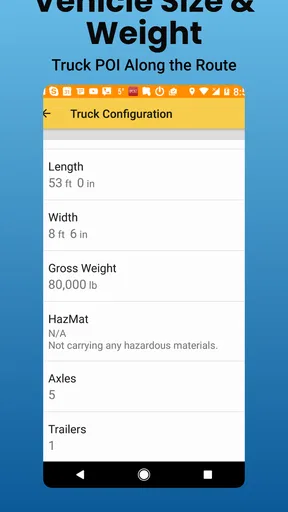
My first habit with a truck-routing tool would be to treat setup as part of trip planning, not as a one-time chore. Before relying on a route, I’d make sure the vehicle details and any relevant restrictions are entered correctly. A route can only be as appropriate as the information behind it; an incorrect height or weight can undermine the very protection the app is intended to provide.
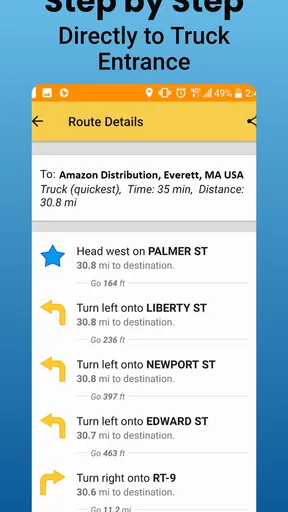
That matters most when a trip includes unfamiliar local roads, older infrastructure, or a delivery point away from major highways. I’d review the route before moving, paying particular attention to the final approach rather than focusing only on the long-distance portion. A safe interstate route does not guarantee that the last few turns into a customer’s site will suit a large vehicle.
Traffic helps, but it does not make every detour better
Live traffic is useful when congestion threatens a schedule, and truck-aware routing can make a reroute more relevant than the one a general navigation app might suggest. Still, I would not automatically take every suggested alternative. A faster-looking detour through unfamiliar streets can be a poor trade if it adds complicated turns, narrow roads, or uncertainty near the destination.
My approach would be to use traffic updates as a prompt to reassess, then check whether the alternative still fits the truck. On a familiar highway corridor, a reroute may be an easy decision. Near a city center or a delivery entrance, I’d be more cautious and compare the new path with the original before following it. The app can help surface a choice; the driver still has to judge whether that choice makes sense for the vehicle and conditions.
What Makes SmartTruckRoute 2 Stand Out?
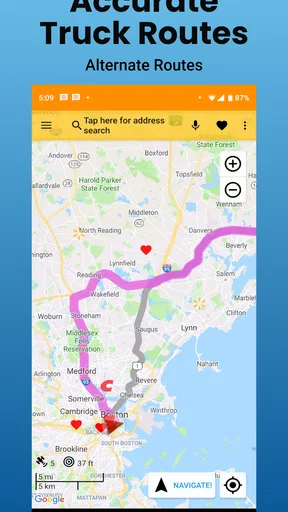
First off, let’s talk about the core functionality of SmartTruckRoute 2. This app isn’t just about getting you from point A to point B; it’s about doing so in the most efficient, truck-friendly way possible. With the app, you can customize your route based on the size and weight of your rig, avoiding low bridges and tight streets like a pro.
Worth Reading Before You Choose

EA SPORTS FC Mobile 26 Is a Bigger Football Game, but It Takes Time

Flipboard Shows What News Apps Must Do Beyond the Feed

Switching to Android Auto Means Rethinking Your Driving Routine

Google Calendar Makes a Crowded Week Easier to Manage

Ludo King Makes the Most of the Minutes Between Plans

Baby Panda World Brings Quick Play to Modern Phones, but Its Game Library Feels Busy
The real magic happens with the real-time updates. Imagine cruising down the highway, and suddenly there’s a traffic jam ahead. The app recalibrates the route faster than you can say "detour." This is a lifesaver, especially when you’re on a tight schedule. Plus, the app is constantly updated with the latest road conditions and restrictions, so you’re always in the know.
IFTA Reporting Made Easy
Now, let’s dive into the IFTA reporting feature. If you’re like me, keeping track of fuel taxes across state lines is about as fun as watching paint dry. Thankfully, the app simplifies this process by tracking your mileage and providing detailed reports. You can say goodbye to the days of sifting through piles of receipts and spreadsheets. Instead, you get a neat, organized report that takes the hassle out of tax season.
I’d treat the mileage reports as a useful working record, not a reason to stop keeping good operating habits. For a real trip, I’d make sure the app is set up before the truck moves, keep its trip records organized as I go, and review the results while the route is still fresh in my mind. That makes it easier to spot a missed trip or an unexpected gap before filing time, rather than trying to reconstruct several weeks from memory.
This is also where the app can fit into a repeatable end-of-day routine. I would check that the day’s mileage appears as expected, note any unusual route changes, and keep fuel documentation in the same regular bookkeeping process I already use. The convenience is having navigation and mileage records together; it does not mean I would abandon a separate backup or assume every report needs no review.
User Experience: Intuitive and Straightforward
What’s the use of a fancy app if it’s more complex to use than a spaceship? Luckily, SmartTruckRoute 2 scores high in the user-friendliness department. The interface is clean, with large, easy-to-read buttons and menus that let you set up your routes with a few taps. Even if tech isn’t your thing, you’ll find yourself navigating the app with ease.
For a driver who repeats familiar lanes, a little consistency can make the app less distracting. I’d use the same trip-planning order each time: confirm the destination, check the truck details, review the proposed route, and only then start navigation. That small routine is more valuable than rushing through setup at the last minute, especially when a delivery address sits in an industrial area where the final approach deserves a closer look.
It’s also sensible to settle route questions while parked. The app’s purpose is to guide a moving driver, not to turn the cab into a place for prolonged map browsing. I’d make any comparisons or corrections before setting off, then rely on spoken guidance where appropriate and pull over safely if a change needs careful attention.
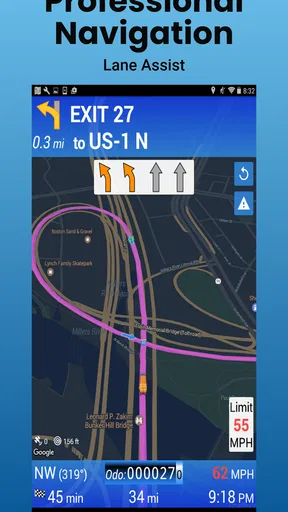
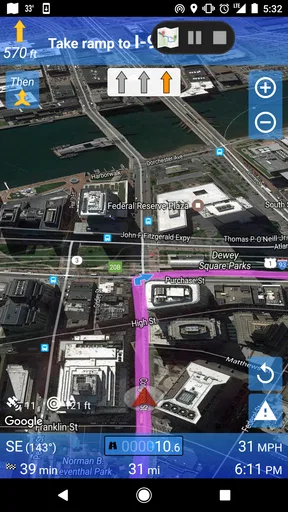
And let’s not forget about the voice navigation feature. When you’re focusing on the road, the last thing you want to do is squint at your phone screen. The app’s clear voice directions ensure you can keep your eyes where they belong—on the highway.
Community and Support
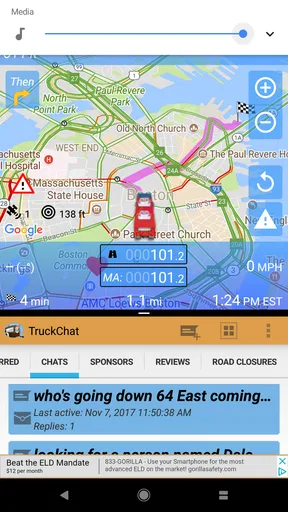
Another cool aspect is the community-driven approach. Users can report road incidents, closures, and other important details, contributing to a shared pool of real-time information that benefits everyone. It’s like having a network of fellow truckers looking out for you.
Shared reports can be a helpful early warning, but I’d treat them as one input rather than a guarantee that every road condition is covered. If a report affects a route I’m about to take, I’d weigh it alongside posted signs, official instructions, and what I can see on the road. That cautious approach is especially useful when a temporary closure or incident could make a familiar route behave differently from usual.
Need help with the app? The support team is responsive and ready to assist with any issues. Whether it’s a technical glitch or just some advice on route optimization, they’ve got your back.
Who benefits most from a truck-focused navigator?
I see the strongest fit for drivers who regularly cross unfamiliar areas, operate a vehicle with important height or weight constraints, or need to keep mileage records for IFTA alongside navigation. Owner-operators may appreciate having route planning and trip records in one tool, while a driver who already has a reliable company workflow may value the truck-specific routing more than the reporting side.
A realistic day might start with a morning delivery in a town the driver does not know, followed by a longer highway run and a state-line crossing. I’d enter the destination before departure, inspect the proposed approach to the first stop, and use traffic changes as a reason to review—not blindly accept—a detour. At the end of the day, I’d check the mileage record while the trip is easy to recall. That workflow gives the app several chances to help without asking it to make every decision.
By contrast, I would not choose this as my only navigation tool if I were driving a car, needed nothing beyond ordinary turn-by-turn directions, or relied on a route being correct without checking the vehicle profile and road situation. A general maps app can be simpler for everyday passenger-car travel. A fleet may also have a dispatch or compliance process that takes priority, so drivers should follow their employer’s established procedures rather than create a competing recordkeeping system.
Costs, setup, and sensible expectations
The app is free to install, is rated for Everyone, and has optional in-app purchases priced from $15.99 to $199.99 per item. I’d look carefully at what an offered purchase covers and whether it matches my own routes and work pattern before paying. A driver who only needs occasional truck-aware guidance may judge value differently from someone who uses navigation and IFTA records throughout the working week.
It has a 4.0 average from around 3,000 ratings, with about 1,900 written reviews and over 100,000 installs. Those figures suggest that it has an established audience, but they cannot tell me whether it suits a particular truck, route, or operating routine. I’d use a familiar, lower-risk trip to learn the controls before depending on it for a tight delivery window.
SmartTruckRoute 2 was released in December 2016, and its current version is 4.2.20260218_898. It supports Android 6.0 and later. Those details make it worth checking device compatibility before installing, particularly if the phone is older or already used for several demanding tasks. As with any navigation app, I’d also think about practical preparation: start with a charged device, set the route while stopped, and avoid making the phone the sole source of information when road signs or safe-driving judgment say otherwise.
Final Thoughts: Is It Worth It?
So, is SmartTruckRoute 2 Nav & IFTA worth adding to your digital toolkit? If you’re a truck driver looking for a reliable, efficient, and user-friendly navigation app, I’d say it’s a solid yes. It’s packed with features that cater specifically to the trucking industry, saving you time and stress on the road.
While there are other navigation apps out there, few offer the same level of customization and real-time updates tailored for truckers. Plus, the added bonus of IFTA reporting makes it a comprehensive tool for anyone in the industry.
In conclusion, whether you’re a seasoned road warrior or just starting your journey behind the wheel, SmartTruckRoute 2 Nav & IFTA is a game-changer worth considering. Safe travels!
Pros
- Real-time traffic updates enhance routing.
- IFTA fuel tax reporting is automated.
- User-friendly interface simplifies navigation.
- Customizable routes for truck specifications.
- Provides reliable customer support.
Cons
- In-app purchases can be costly.
- Occasional GPS signal loss issues.
- Limited offline map functionality.
- Battery drain can be significant.
- Initial setup may be confusing.
FAQs for SmartTruckRoute 2 Nav & IFTA
What are the main features of SmartTruckRoute 2 and how does it benefit truck drivers?
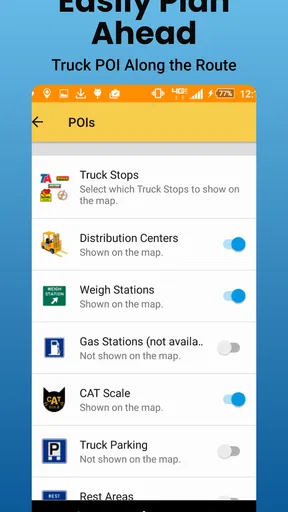
SmartTruckRoute 2 offers comprehensive navigation specifically designed for truck drivers. It includes features like real-time traffic updates, truck-specific routing, weigh station alerts, and fuel pricing information. The app helps drivers avoid low bridges, restricted roads, and other hazards, ensuring efficient and safe routes. These features collectively enhance productivity and reduce travel time.
Is SmartTruckRoute 2 available on both Android and iOS platforms?
Yes, SmartTruckRoute 2 is available for both Android and iOS devices. Users can download the app from the Google Play Store or the Apple App Store, ensuring compatibility with a wide range of smartphones and tablets. This cross-platform availability ensures truck drivers can use the app regardless of their device preference.
How reliable is the real-time traffic information provided by SmartTruckRoute 2?
The real-time traffic information in SmartTruckRoute 2 is highly reliable, as it integrates data from multiple sources, including government traffic feeds and user reports. This ensures that drivers receive up-to-date information about road conditions, helping them avoid traffic jams and delays. The app continuously updates, providing dynamic rerouting options when necessary.
What subscription options does SmartTruckRoute 2 offer, and is there a free trial available?
SmartTruckRoute 2 offers various subscription plans, including monthly, yearly, and lifetime options, catering to different budget needs. While the app itself isn’t free, new users can often take advantage of a free trial period to explore its features before committing to a subscription. This allows potential users to determine if the app meets their navigation needs.
How does SmartTruckRoute 2 handle IFTA reporting and what are the benefits?
SmartTruckRoute 2 simplifies IFTA reporting by automatically tracking miles driven in each jurisdiction. This feature reduces the administrative burden on drivers and fleet managers by ensuring accurate and easy-to-access mileage logs. The app helps avoid errors and penalties associated with manual reporting, thus saving time and ensuring compliance with IFTA regulations.


